October 4, 2026
Side NotesNaruto Hand Signs Recognition Using CNNs, Yolo & Mediapipe + MLP
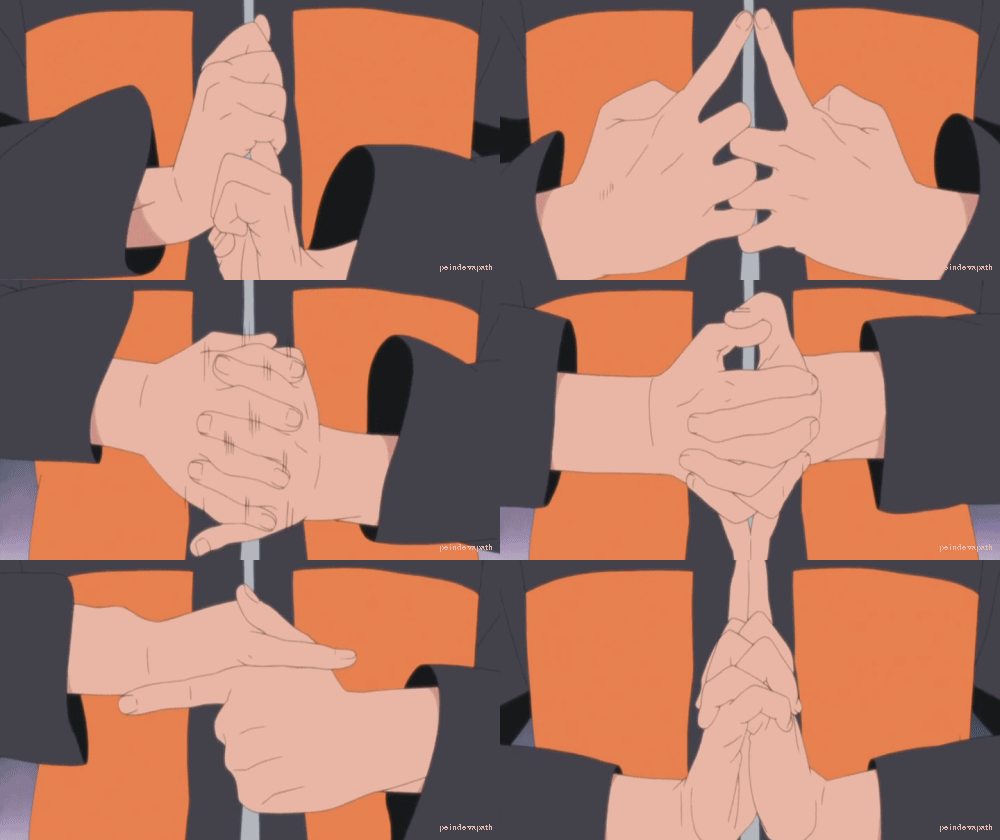
Naruto is an anime where characters perform sequences of hand signs to activate different techniques called “jutsu,” specifically a form of ninja technique known as ninjutsu. Depending on the sequence of signs, a jutsu can produce effects ranging from creating multiple clones to raising a wall of mud.
The goal:
The goal is to make any hand sign in front of the camera and a trained model can identify those signs and label them accordingly. For reference, here is what those signs look like:
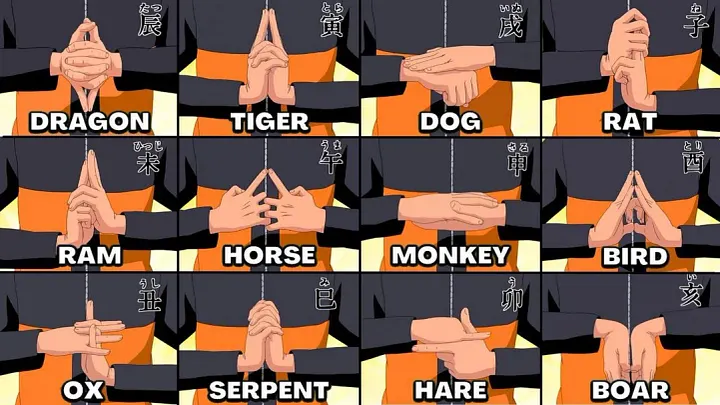
Below are a few methods I explored:
- CNN
- Yolo
- Mediapipe & MLPs
CNNs:
Convolutional Neural Networks are known best to work with images and visual data. This happens to be the main reason why I started off with this approach.
CNNs processes images by passing them through layers of filters that detect increasingly complex patterns. In the first layers, small filters scan across the image and learn to recognize simple features such as edges, corners, and textures. These features are then combined in deeper layers to identify more complex shapes and structures. Pooling layers may reduce the spatial dimensions while retaining the most important information, making the network more efficient. Finally, the extracted features are passed through fully connected layers to produce a prediction, such as identifying what object is present in an image. Or in this case, the “hand sign” made in an image.
This is the dataset used to train: https://www.kaggle.com/datasets/vikranthkanumuru/naruto-hand-sign-dataset
The CNN architecture I used was as follows:
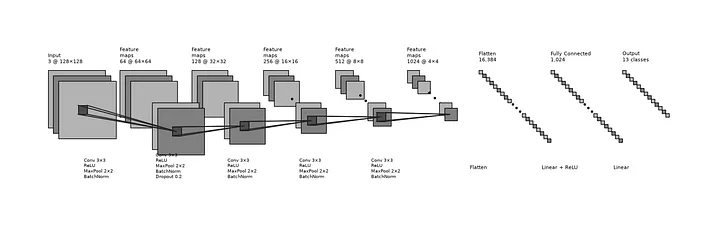
The model consists of five convolutional blocks, where each block uses a 3×3 convolution followed by ReLU activation, 2×2 max pooling, and batch normalization. The number of feature maps increases progressively from 64 to 1024 across the blocks, allowing the network to learn increasingly complex visual features. Dropout is applied in the second convolutional block and again before classification to reduce overfitting. After the final convolutional block, the feature maps are flattened into a 16,384-element vector and passed through a fully connected layer of 1,024 neurons with ReLU activation. A final linear layer maps these 1,024 features to 13 output classes. (13 classes because the dataset contained 13, even though naruto hand signs are actually 12 but I didn’t want to mess that up so I went with it)
On the images other than the provided dataset, the model was labelling them wrong for example here the anime sign is actually ‘Tiger’ which the model incorrectly classifies as ‘Ram’. In my model’s defense, both of these signs are pretty close so it makes sense that the model is confused
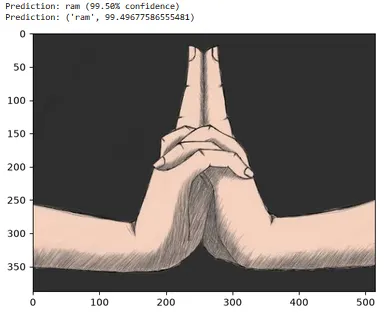
CNN wasn’t exactly performing bad or anything but turns out training one is a slow and a highly repetitive process one where you have to try on different architectures , especially if you’re new like me, to find a perfect balance. the cost of training each said iteration was a few hours at least on my hardware so being lazy — or as i prefer to call myself “strategic”, i went on to try a different approach. Here’s my experiments in this repository if needed , you can also download, modify or attempt at training a better model:
https://github.com/row-huh/CNN-Naruto-HandSigns
If you find it slow to train CNNs on your hardware or maybe you got caught up in trying to make cuda work with pytorch and eventually gave up like me, I’d recommend training on colab as they let you change runtime to a t4 GPU which is much faster
YOLO:
Yolo (You Only Look Once) is an object detection system, it’s a pretrained convolutional neural network that in many situations is finetuned to match different usecases. I found this repository doing pretty much the same thing I was trying to do but much more cooler:
https://github.com/Kazuhito00/NARUTO-HandSignDetection
I would suggest reading through this to gain an understanding of how YOLO was used here, this approach is what I mostly followed - although remember to open the english readme (there are no subtitles here xD)
What was done in this repo was that a YOLO Nano was finetuned to identify classes. This repo uses a few datasets, one from kaggle, one is an anime images one and a private dataset that Kazuhito-san made himself (P.S. I refer to the owner of this repository as Kazuhito-san out of respect . His work heavily influenced this project, including the MediaPipe + MLP approach used later on.)
If you’d like to learn more about finetuning yolo I’d recommend the following sources as well, these helped me a lot :
- https://medium.com/data-science/the-comprehensive-guide-to-training-and-running-yolov8-models-on-custom-datasets-22946da259c3
- https://medium.com/@amresh.kumar11/fine-tuning-yolo-for-custom-object-detection-a-complete-guide-6ce3724ce9f1
Yolo requires a certain data.yaml file which outlines the directories for train/test/val splits and also the class names as described below
train: train/
val: val/
test: test/

nc: 12
names:
  0: Monkey
  1: Dragon
  2: Rat
  3: Bird
  4: Serpent
  5: Ox
  6: Dog
  7: Horse
  8: Tiger
  9: Boar
  10: Ram
  11: Hare
Moreover, YOLO expects the dataset to be organized into separate folders for images and labels. Each image has a corresponding .txt label file containing the bounding box coordinates and the class assigned to each object in the image. To put things into perspective, this what the dataset is supposed to look like:
dataset/
├── train/
│   ├── images/
│   │   ├── bird0001.jpg
│   │   └── ram0001.jpg
│   └── labels/
│       ├── bird0001.txt
│       └── ram0001.txt
├── val/
│   ├── images/
│   └── labels/
└── test/
    ├── images/
    └── labels/
Unlike Kazuhito-San’s work, I didn’t want to make my own dataset while trying to use yolo nor did I want to annotate it so I just took the easy way out: I found a couple of other annotated hand sign datasets and started to train my model
The datasets I got were from the following two sources:
- https://universe.roboflow.com/yylunxie/naruto-hand-sign-p8toe
- https://github.com/lucasfernandoprojects/hand-sign-detection
And I merged them into one dataset using a script I’ve named merge_yolo.py that can be found here:
https://github.com/row-huh/yolo-naruto
I’m sure there must be more tweaks I could’ve done to improve the model performance but it was just a lot of annotation and training time that I didn’t want to deal with so I got thinking and I remembered using MediaPipe in a couple of instances recently and i thought that maybe Mediapipe + simple math where I measure each fingers position relative to each other will be enough. Sadly Naruto hand signs are pretty complicated and Mediapipe often gets really confused as there’s too much overlap between all the hands being twisted within each other and what not.
Apparently, Mediapipe also allows you to train a gesture recognizer, which I haven’t tried yet but this is another approach that someone interested can take. This is an article i started reading before trying out the MLP so might be helpful;
MediaPipe Landmarks to MLP:
The final approach I tried was to take mediapipe landmarks and train them on a multi-layer perceptron. I’ll explain the next steps in a reproducible way so following along is also an option.
The steps are:
- Finding a dataset + converting into mediapipe expected format
- Extracting landmarks by running mediapipe on all images
- Training: Feeding the landmarks into a vanilla multi layer perceptron
- Testing: Validating the trained model against a small test chunk
- Running the model in real time for gesture detection
Finding a dataset + converting into mediapipe expected format:
This was by far the most tedious step in all of this, so once you’re through this the rest is pretty straightforward. You need a bunch of images in the following format:
dataset
  |---Boar
  |---Dog
  |---Tiger
  |---...other class names
Notice here how each hand sign class is a separate folder. This is what mediapipe expects.
For me, i initially gathered my dataset from the same two sources I used in Yolo above. And yep both of those sources are in yolo format so to have these in a mediapipe expected format, all you need to do is rearrange them into the target format specified above.
Or you can make your own dataset, by running this script once for every class and storing into a relevant class folder. For example running this script and taking 100 images of any hand sign and saving into a folder named the same as that said hand sign. Mediapipe can do with about a hundred samples per class so it’s doable by running an automated script.
import cv2
import os
import time

# Configuration
NUM_IMAGES = 200
INTERVAL = 1 # seconds
OUTPUT_FOLDER = "captured_images"

os.makedirs(OUTPUT_FOLDER, exist_ok=True)

cap = cv2.VideoCapture(0)

if not cap.isOpened():
    raise RuntimeError("Could not open webcam.")

print("Press 'q' to quit early.")

last_capture = time.time() - INTERVAL
image_count = 0

while image_count < NUM_IMAGES:
    ret, frame = cap.read()

    if not ret:
        print("Failed to read frame.")
        break

    current_time = time.time()
    remaining = max(0, INTERVAL - (current_time - last_capture))

    # Display info
    cv2.putText(
        frame,
        f"Captured: {image_count}/{NUM_IMAGES}",
        (10, 30),
        cv2.FONT_HERSHEY_SIMPLEX,
        0.8,
        (0, 255, 0),
        2,
    )

    cv2.putText(
        frame,
        f"Next capture: {remaining:.1f}s",
        (10, 65),
        cv2.FONT_HERSHEY_SIMPLEX,
        0.8,
        (0, 255, 255),
        2,
    )

    cv2.imshow("Webcam Capture", frame)

    # Capture every INTERVAL seconds
    if current_time - last_capture >= INTERVAL:
        image_count += 1
        filename = os.path.join(
            OUTPUT_FOLDER,
            f"image_{image_count:03d}.jpg"
        )
        cv2.imwrite(filename, frame)
        print(f"Saved {filename}")
        last_capture = current_time

    # Quit if 'q' is pressed
    if cv2.waitKey(1) & 0xFF == ord("q"):
        print("Stopped by user.")
        break

cap.release()
cv2.destroyAllWindows()

print("Done.")
When you’re training a CNN, you purposefully warp or zoom some images to make your model learn those patterns, that’s data augmentation. MediaPipe doesn’t need that. If anything, adding warped or zoomed images will only confuse the neural network we train on the landmarks, or worse, MediaPipe won’t even recognize hands in those warped images.
From a high level, this is how the final architecture is supposed to look like:
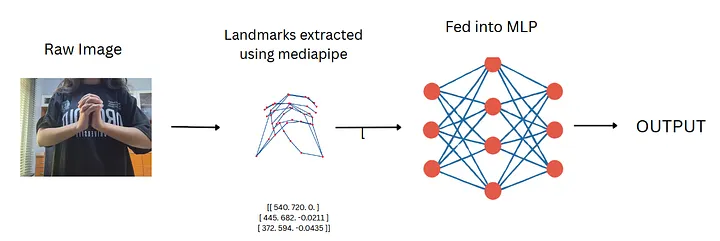
A raw training image (or set of images) is first passed through MediaPipe to extract the relevant landmarks. These landmarks are converted into NumPy arrays and used as the input training data for the Multi-Layer Perceptron (MLP).
The overall pipeline is straightforward: an image is processed by MediaPipe to extract its landmarks, which are then fed into the neural network. The MLP processes these landmark features and outputs the predicted gesture class. The intended MLP architecture is shown below:
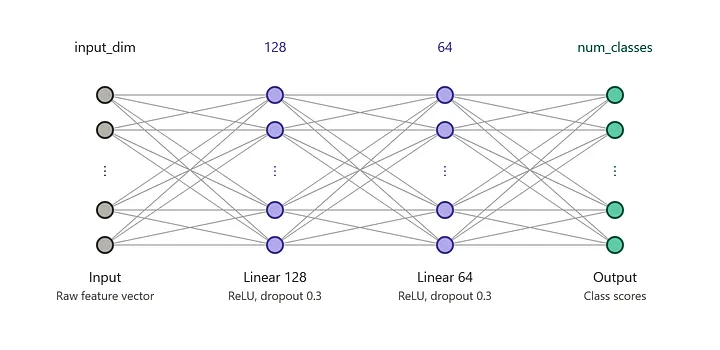
The MLP is a simple three-layer feedforward classifier that funnels input_dim features(126) down through a 128-neuron hidden layer, then a 64-neuron hidden layer, before landing on 12 output logits. Each hidden layer pairs a linear transform with ReLU activation (zeroes out negatives) and Dropout of 0.3 (randomly drops 30% of activations during training to fight overfitting). The final layer is a bare linear layer with no activation, since it's meant to output raw logits for a loss function like crossentropyloss to handle the softmax internally.
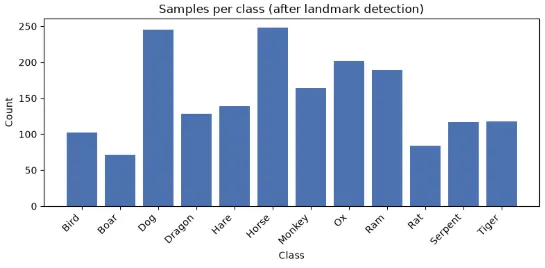
Depending on the images you’re using, it’d be better to drop all those where mediapipe fails to recognize hands. In my case, I initially had a lot of images but many were dropped because hands couldn’t be detected on those so I was left with around ~1800. The resulting distribution looks as follows:
The next step is to train the MLP!
The training happened in like less than 5 minutes and these are the predictions on all of my testing images.
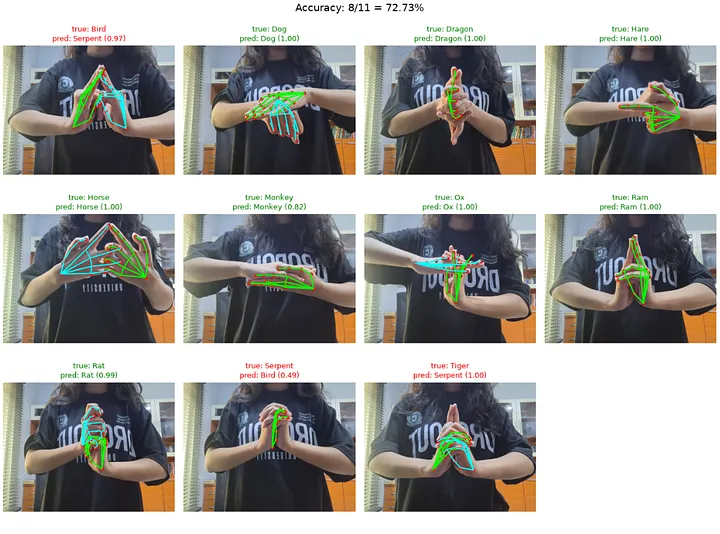
You may notice that it’s getting confused between bird and serpent. My hypothesis is that whatever the hand signs the model is confused about (for example bird and serpent) — the fix is to just add more clean samples of these hand signs in the training data. It’s possible that when parsing all images using mediapipe, a lot of bird and serpent examples were removed — and those that remained were somewhat blurry/confusing for mediapipe.
At this point I took a few more samples(~30 ish) for the confusing classes (bird, serpent and tiger) and appended them to the existing dataset I already had to see if it’ll fix anything. Along with adding more samples, i actually increased training epochs from 100 to 300 and this was the result:
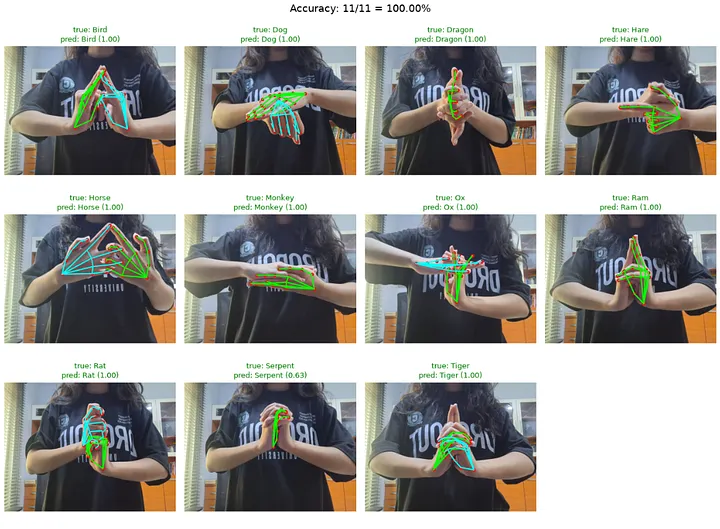
Now here I know the test set is really small and you can’t really measure the accuracy of a model if all the testing images are taken under the same lightning and background. So It’s now time to try the trained model saved as model.pt and have it perform inference on a video in real time.
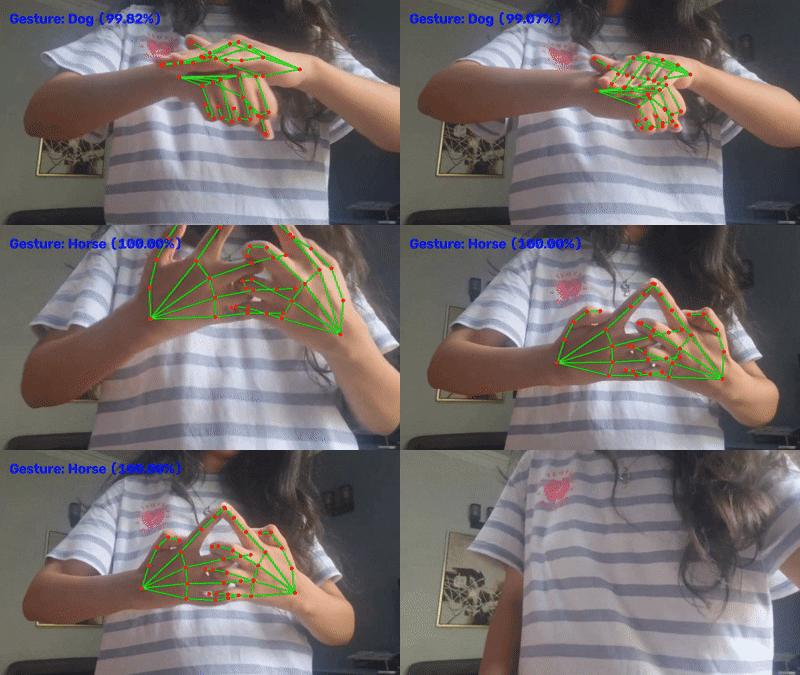
It looks fine on the surface, but once you start testing it more extensively, a small flaw becomes apparent. For example, if I make random hand signs, the model may still classify them as one of the Naruto gestures. Similarly, even when I make a valid hand sign with the hands positioned farther apart, the model still tends to predict the corresponding gesture.
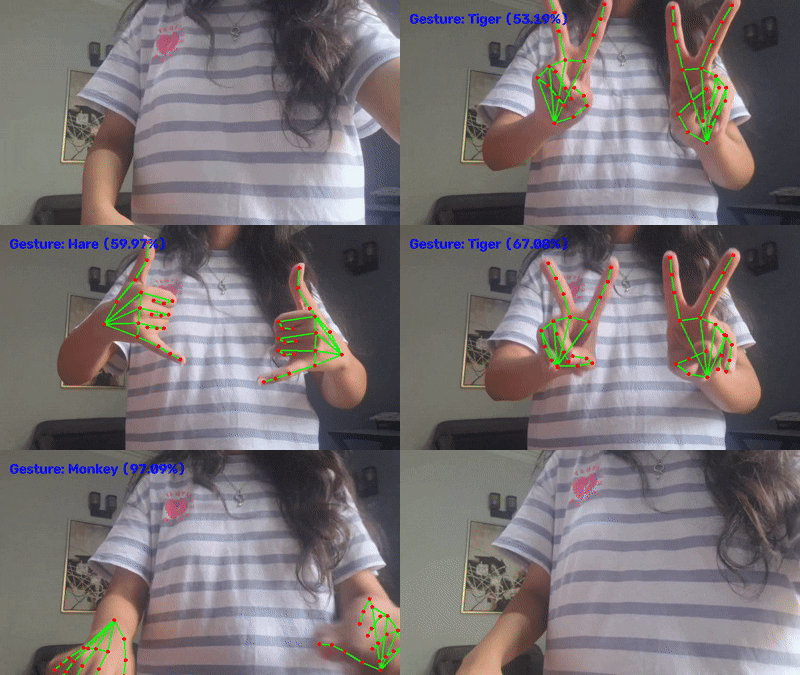
The main problem here is that there is no information being passed to the model about the distance between the two hands, which can cause some confusion. My solution was to add an inter-hand distance feature and set a detection threshold of around 60%, where anything below that would be labelled as None to reduce these false predictions.
The inter-hand distance is simply the straight-line (Euclidean) distance between the two hands’ wrists in raw image-space coordinates. It is calculated as dx, dy, dz = right_wrist - left_wrist, followed by dist = ||(dx, dy, dz)||, or sqrt(dx² + dy² + dz²), before either hand is wrist-centred and scaled.
Adding the inter-hand distance by itself only made a small difference. I also added a confidence threshold to the inference script, so that anything below the threshold would be classified as None instead of being forced into one of the Naruto gestures. Together, these changes made the results much much better and reduced a lot of the incorrect classifications.
And Alas,
The Final Demo
Model now correctly shows all random gestures as ‘None’ and inter-hand distance isn’t a problem anymore :)
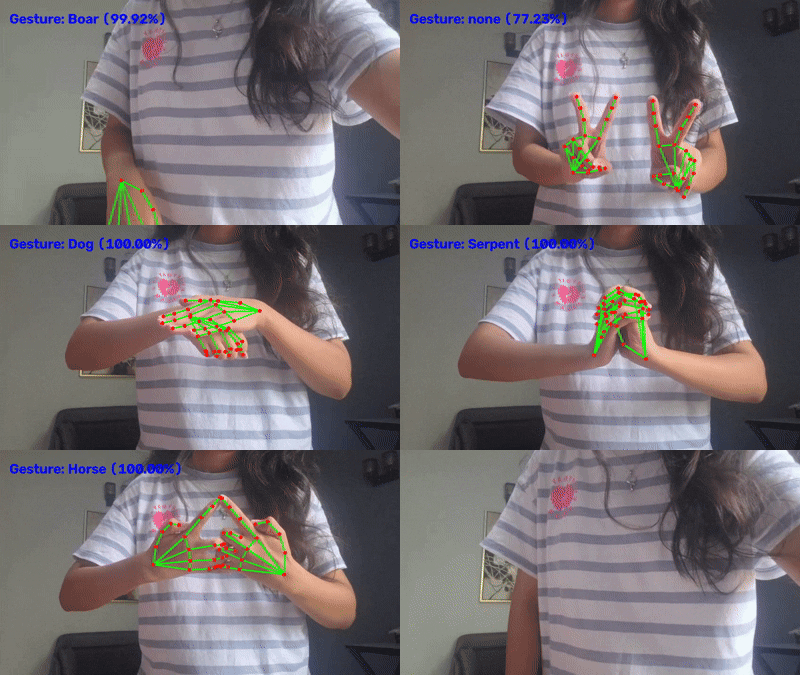
Code Repository: https://github.com/row-huh/mediapipe-gesture-recognizer-naruto-handsigns
One final thing I could’ve included was to have a ‘queue’ where the history of all the handsigns you made is also showing up but I got lazy so : That’s all, Folks!